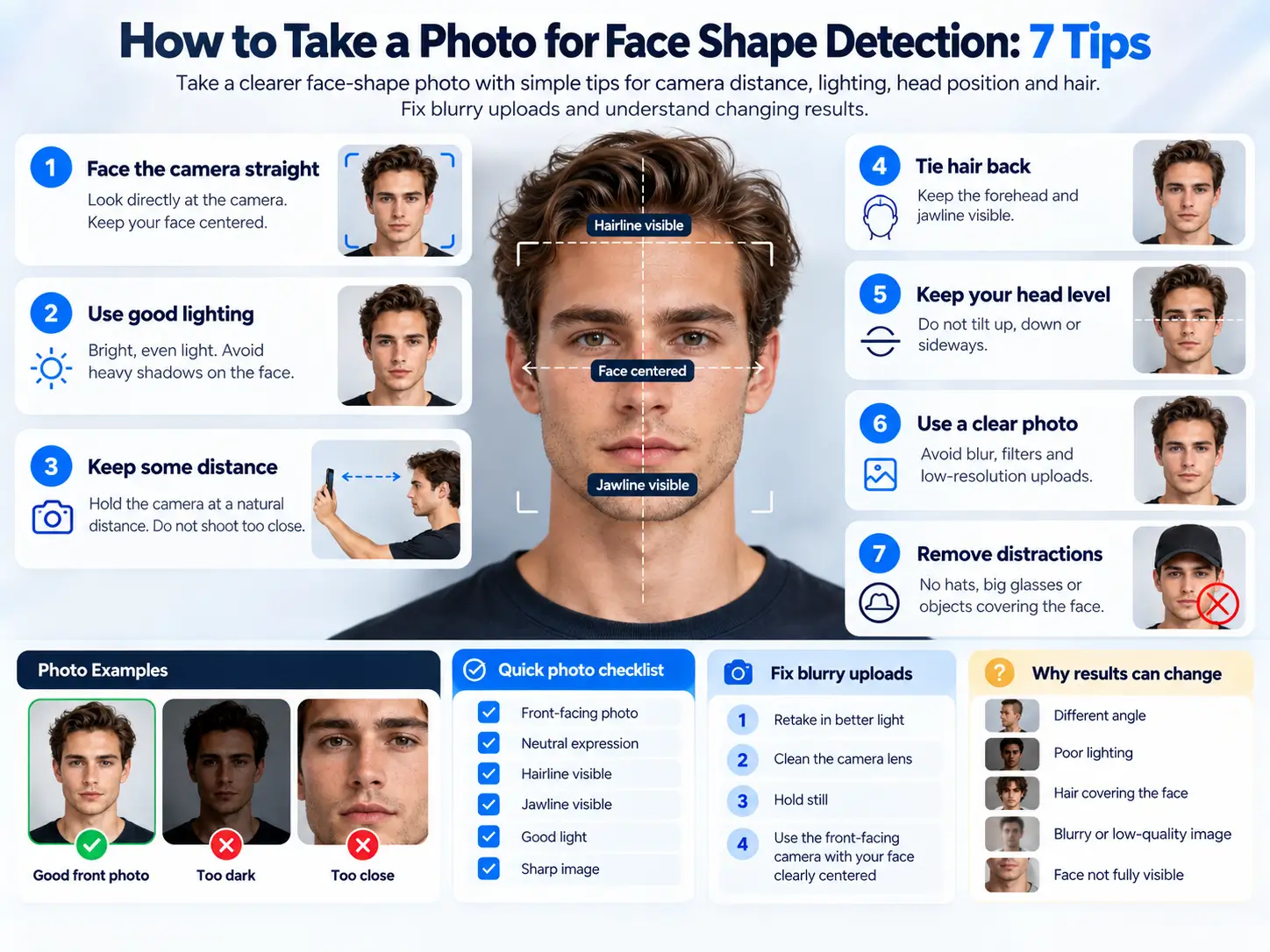
How to Take a Photo for Face Shape Detection
A clear photo gives the tool a better view of your outline. Start with a level camera, soft light and an unfiltered picture of one person.
The quick photo checklist
Face the camera straight on, keep it at eye level, move hair away from your outline, and use even light. Keep your mouth relaxed. Include the whole face, from above the forehead to below the chin. Turn off beauty and reshaping effects.
Use one person per image. Our detector accepts JPG, PNG and WebP files up to 10 MB. You do not need to enter measurements or place points for an automatic result.
A better photo can make measurements easier to repeat. It cannot guarantee a correct label: the landmark model, our measurement choices and overlapping shape categories can also affect the answer.
Open the face shape detectorSet up your camera in seven steps
- Put the camera at eye level. Look at the lens with your head upright. Avoid looking down at a phone in your lap or raising it above your forehead.
- Step back from very close selfies. If space allows, place your phone around 1.5 meters / 5 feet away and use a timer or ask someone to take the picture. This is a practical starting point, not a required distance or an accuracy guarantee.
- Keep the whole face in the frame. Leave a small margin above the head and below the chin. Both sides of the jaw should be visible. Crop afterward if needed, but do not cut off the outline.
- Face a soft light source. A window in front of you often works. Avoid a bright window behind you, a lamp lighting only one cheek, or strong shadows across the jaw.
- Move hair away from the face. Show the forehead, temples and jaw as well as you comfortably can. Do not draw or guess a hidden hairline. A large beard can hide the lower outline; treat that result cautiously.
- Relax your expression. Keep your lips gently together or at rest. Avoid a wide smile, puffed cheeks or pushing your jaw forward. The aim is a repeatable resting pose.
- Switch effects off and check focus. Use an ordinary photo without slimming, stretching or face reshaping. Check that the edges look clear before choosing the file.
Front and rear cameras can both work. Distance, framing and the actual camera settings matter more than assuming one camera is always correct. Avoid an ultra-wide close-up. Digital zoom alone cannot undo the perspective of a photo already taken too close.
Why distance and angle matter
A camera records a view of your face from one position. Features closer to the camera can look larger relative to features farther away. That is why a close selfie can look different from a picture taken by someone standing back.
Rutgers researchers modeled this effect for the nose, comparing close selfies with portraits taken farther away. Their work supports being cautious with close-up proportions; it does not validate our face-shape classifier or establish a perfect photo distance for every phone.
Turned sideways?
One cheek is nearer the lens. The visible widths no longer represent a straight-on comparison. Turn your whole face toward the camera.
Chin raised or lowered?
The face can appear shorter or longer in the image. Bring the camera to eye level and keep the chin in a natural position.
Taking another photo from the same setup is more useful than comparing a straight-on portrait with a dramatic social-media pose.
Fix common photo problems
| Problem | Next step |
|---|---|
| No face found | Use a sharper, brighter front-facing image. Make sure your face is large enough to see clearly. |
| More than one face | Choose a solo photo. Crop other people out while keeping your entire face visible. |
| File will not open | Export it as JPG, PNG or WebP. Renaming “.heic” to “.jpg” does not convert the image. |
| File is too large | Save a smaller copy below 10 MB. Keep enough detail to see the face edges. |
| Camera will not start | Allow browser camera access on the HTTPS page, or choose an existing photo instead. |
| Analysis cannot finish | Retry once with a supported browser and a stable connection. Model loading or browser support can fail even when the photo is good. |
| Result changes between photos | Compare camera position, expression, hair and measured lines. Read both close shape matches instead of treating either as certain. |
Do not keep making your face smaller or more filtered to get a preferred result. If the photo is suitable and the answer still seems off, the tool may simply be a poor fit for that image or outline.
What the detector can and cannot see
The AI estimates facial landmarks. Our code turns selected points into widths, a length estimate and an outline comparison. It does not reliably find your true hairline. The upper face boundary is a geometric estimate, and that affects the length-to-width ratio.
After an automatic result, you can optionally inspect the points. Only move the upper point to a hairline you can actually see. Correcting a point can change the result; it does not make the category a medical fact.
The scores show fit to our custom rules. They are not beauty scores, accuracy percentages or proof that you belong to one permanent category. If the top two are close, use the face shape chart to compare their outlines.
For a number-based cross-check, the face shape calculator accepts four measurements. Keep the method consistent: straight photo widths and a tape curved over skin are different measurements.
Photo processing happens in the browser. The model and code require downloads, and MediaPipe sends Google usage/performance metrics. Read the tool’s notice before starting; local photo processing does not mean the whole website makes no network requests.
Photo questions
Should I smile?
Use a relaxed expression for the comparison. A wide smile changes the visible cheeks and lower face, so it makes repeated measurements harder to compare.
Can I use a mirror selfie?
A straight-on, clear mirror photo may be usable, but the phone can cover your face or encourage a sideways pose. A timer photo is usually easier to frame without an obstruction.
Do I need to remove glasses?
If it is comfortable, remove frames that cover the cheek or eye area. Reflections and large frames can hide features. You should not have to sacrifice comfort or safety to use a styling tool.
What if I have a beard or a receding hairline?
These can make the chosen measurement boundaries uncertain. Do not invent a hidden hairline or assume the beard edge is the jawbone. Treat the result as tentative and compare visual guides.
Does cropping fix a distorted selfie?
Cropping changes what is included in the picture. It does not change the viewpoint from which the original photo was taken. Retake a very close or angled selfie if proportions look distorted.
Is this a guide for surgery or medical photographs?
No. This checklist is for a casual styling tool. Follow your clinician’s own photography instructions for a medical assessment.
Sources and method notes
Rutgers: camera distance and selfie distortion supports the discussion of perspective, not face-shape accuracy.
Google: Face Landmarker for the web documents landmark detection. File limits, measurement boundaries and result labels above describe GoldenRatioFace’s tool.
MediaPipe privacy notice explains local input processing and usage metrics. Sources and tool behavior reviewed October 6, 2026.
3 thoughts on “How to Take a Photo for Face Shape Detection: 7 Tips”