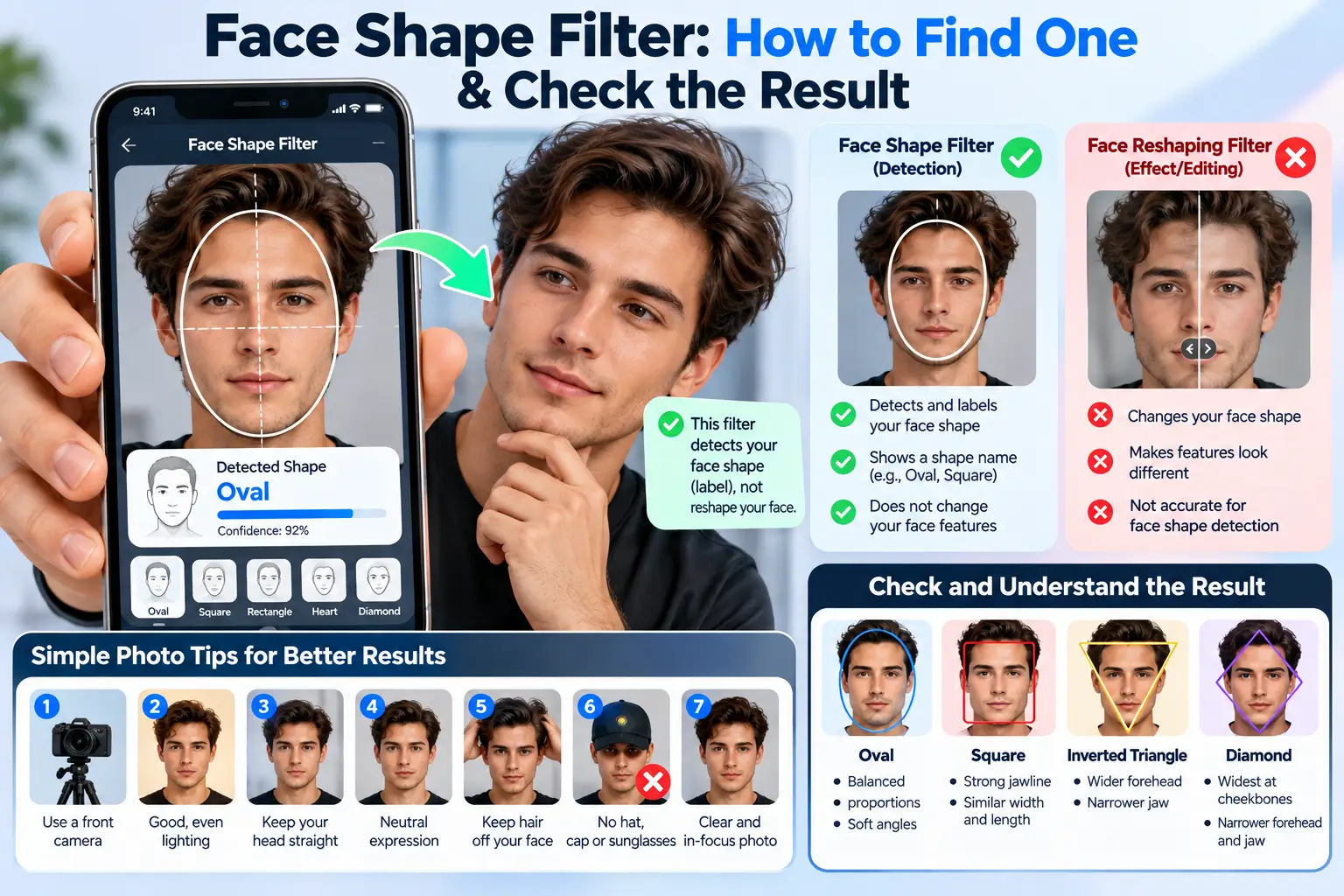
Face Shape Filter: Find One and Understand the Result
Want a social-app effect, or want to estimate your face shape? Start by checking whether the effect adds a label, draws a guide, or changes the face in the picture.
What does a face shape filter do?
“Face shape filter” can mean several different effects. Some show a shape label. Some place an outline over your face for comparison. Others make the jaw, cheeks or other features look different in the image.
A name such as “face shape test” does not tell you how the effect works or prove its accuracy. Look at the creator’s description and compare the image with the effect switched off.
If you want an automatic estimate with visible measurements instead of a social effect, use our face shape detector. It compares proportions without reshaping the uploaded image. Its category result is still an estimate.
Try the browser detectorHow to find a face-shape effect
On Snapchat
Open Snapchat’s Lens Explorer and search for terms such as “face shape” or “face shapes test.” Check the Lens name and creator before opening it. Snapchat’s own public catalog includes a Face Shapes Test Lens; its listing can help you find that specific effect.
A live listing is not evidence that the Lens has a validated classification method. Availability can also depend on your device, app version, account or location. Follow Snapchat’s current Lens Explorer instructions if the interface looks different.
On TikTok, where available
Look for face-shape videos or effect names in the app. If a video shows an effect link, open it and check the effect’s creator and description. TikTok’s official help explains how effects are added to videos, but there is not one universal face-shape effect with a guaranteed name or result.
Do not assume an effect from an old tutorial is still available. If an app or effect is unavailable in your country, you can use the browser detector without needing that social app.
Without a social app
For the browser option, open the detector, read its photo-analysis notice, and choose a clear image of one person. No social account is needed. You can also use the shape chart without uploading anything.
Four things an effect might be doing
| Function | What you see | What to check |
|---|---|---|
| Label or quiz effect | A word such as oval or heart appears. | Does the creator explain measurement, random selection or quiz logic? A label alone cannot tell you. |
| Outline guide | A shape outline sits over your face. | Is it fitted to landmarks, or are you moving your face to fit a fixed outline? |
| Reshaping effect | Jaw width, cheek outline or other features visibly change. | Turn it off and compare. The edited frame should not be treated as an unaltered measurement photo. |
| Landmark-based analyzer | The tool shows measured lines, ratios or a ranked result. | Look for the measurement definitions, scoring method and limitations. Numbers do not prove accuracy by themselves. |
An effect can do more than one of these at once. A labeling effect might also smooth or reshape the image. That is why it is too broad to say that all “identifying filters” leave the face unchanged.
Can you trust the result?
You need evidence about the particular effect to judge its accuracy. A popular video, a precise-looking percentage, or the word “AI” is not enough. Without a published method and useful validation, treat the label as a tentative styling clue.
Our own detector separates the landmark model from the category rules. AI estimates facial points; our code uses selected distances to compare eight profiles. We publish the method and show close alternatives, but we have not validated an accuracy percentage on a large labeled population dataset.
Transparency makes a result easier to question. It does not, on its own, prove that our answer is more accurate than every social effect.
A quick check you can do
- Turn off other beauty or reshaping effects.
- Use a level, front-facing photo with a relaxed expression.
- Read what the effect says it measures.
- Compare its label with the visible forehead, cheek and jaw widths.
- If two labels seem plausible, keep both as options.
For help preparing the image, use the photo checklist. For the category meanings, read face shape explained.
Check the photo and privacy settings
A reshaping filter changes the displayed image, not the underlying structure of your face. Do not upload that altered frame to a detector and assume it represents your unedited proportions.
Privacy practices also vary by product. Before choosing a photo, look for whether it is uploaded, how it is used, whether it is retained, and which providers are involved. “Free” and “AI” do not answer those questions.
GoldenRatioFace’s detector processes the chosen image in the browser. It downloads model/code assets, and MediaPipe sends Google usage/performance metrics. Google’s notice says the input image itself is processed on-device and is not sent to Google servers by MediaPipe. The site also uses Google Analytics. Read the tool’s notice and our privacy policy before starting.
You can choose not to use a photo tool. The chart and written guides remain available, and the calculator has an optional number-entry mode.
Face shape filter questions
Which face shape filter is the most accurate?
We cannot name a winner without comparable testing of specific versions on suitable images. Look for a clear method, measured features, limitations and validation rather than treating popularity as evidence.
Why do TikTok and another tool give different labels?
They may use different rules, combine shape categories differently, or read a different camera view. One might also be a quiz or visual effect rather than a measurement tool. Check the actual effect before comparing answers.
Why can I not find the filter from a video?
The effect may have changed, been removed or become unavailable for your device or location. Check the effect link and creator if available, then use the app’s current search or help instructions.
Can I find my face shape online without an app?
Yes. Our browser detector provides an automatic photo estimate, and the shape chart lets you compare outlines without a photo upload. Both are starting points for understanding proportions.
Is a golden ratio filter the same thing?
No. A golden-ratio overlay or comparison uses a mathematical proportion or template. It does not answer the same question as classifying an outline as round, oval or another shape.
Can a filter tell me which haircut to choose?
It can offer an idea, but hair texture, growth pattern, maintenance and your taste still matter. Use a result to shortlist options, then discuss the practical cut with your barber or stylist.
Sources and review notes
Snapchat Support: finding Lenses and the linked official Lens listing support the discovery guidance. We checked the listing, not the Lens’s accuracy inside the app.
TikTok Support: effects describes platform effects. Names, availability and interfaces can change.
Hedman and colleagues: effects of selfie filters on face detection and recognition studies how particular image effects influence those tasks. It does not validate face-shape labels or rank commercial filters.
MediaPipe privacy notice supports the distinction between local input processing and metrics. Reviewed October 6, 2026.