Face Recognition vs Face Detection: What Is the Difference?
Finding a face in a picture is different from checking who that person is. Here is what detection, landmarks, verification and identification actually do.
The simple difference
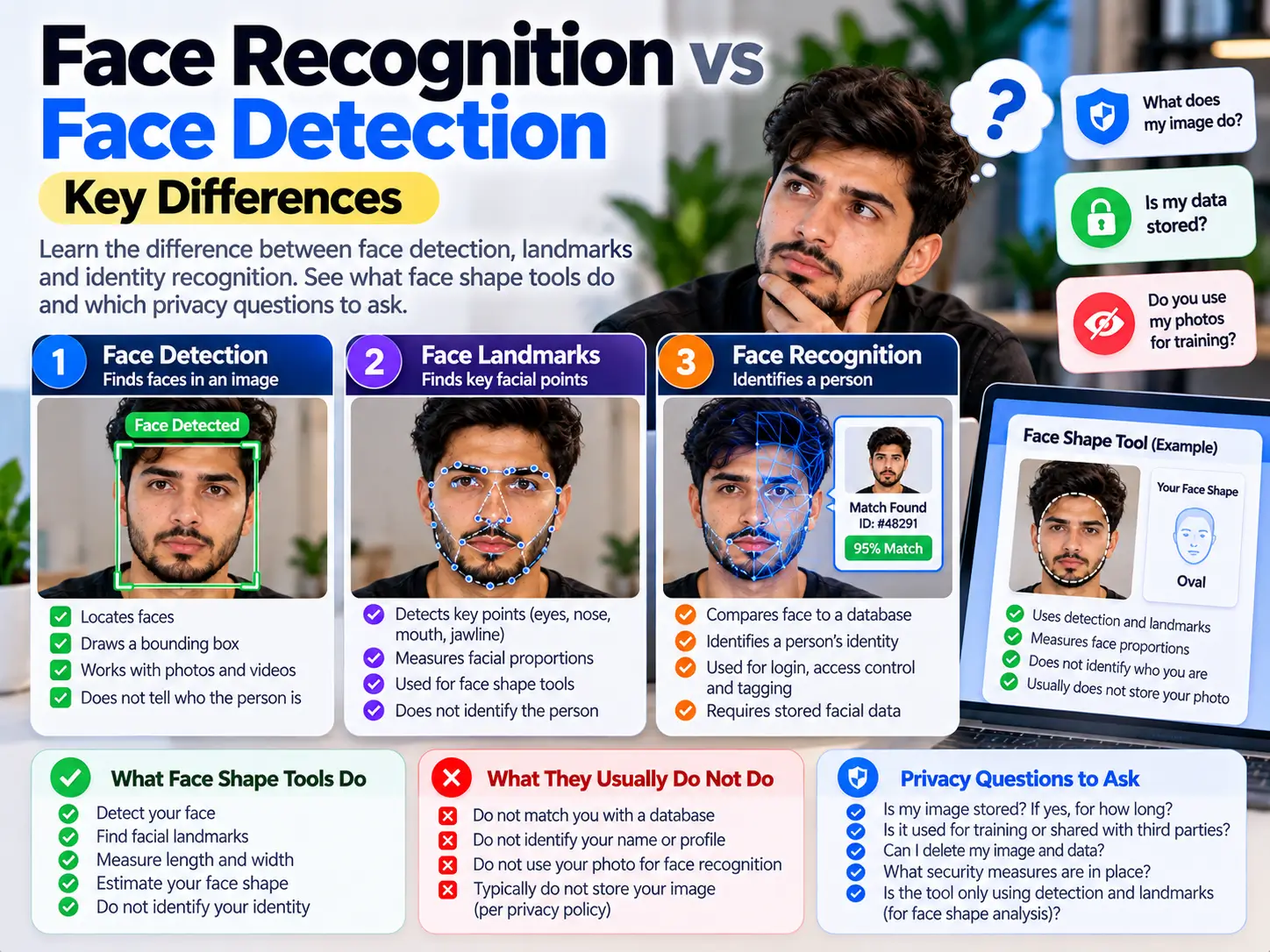
Face detection asks, “Where is a face?” Face recognition compares facial information to help check or find identity. A face-shape tool can detect a face and estimate its outline without knowing the person’s name.
These are different capabilities. A product can combine them, so the word “detection” alone is not a complete privacy promise.
Four terms that are often mixed up
| Capability | Question | Typical output | Simple example |
|---|---|---|---|
| Face detection | Where is a face in this image? | A face region; some systems also return a few feature points. | A camera draws a box around a face. |
| Facial landmarks | Where are facial features? | Estimated points around features such as eyes, lips and the outline. | An effect follows the eye position. |
| Face verification | Do these two face samples appear to belong to the same person? | A similarity comparison and a decision under a chosen threshold. | A new photo is compared with an enrolled photo. |
| Face identification | Which stored candidate, if any, looks like this face? | Possible matches from a collection. | A face is compared against many stored records. |
Verification is commonly called one-to-one, or 1:1. Identification is commonly called one-to-many, or 1:N. Recognition does not always require a database of people’s names: a one-to-one comparison can work with two samples, and stored templates may use identifiers instead of names.
Detection and landmarks do not establish identity
A detector locates a face in an image. Some detection systems return only a region and score; others also return key points or contours. It is inaccurate to say that every detector only draws a box.
A landmark model estimates feature locations. Those points can help position an overlay, measure distances in a picture or track movement. They do not, by themselves, tell you who the person is.
Google’s ML Kit documentation explicitly separates its face detection capability from recognizing individuals. Its examples include feature coordinates and contours. MediaPipe’s Face Landmarker is a separate tool for estimating facial landmarks and related outputs. Neither description means that every app built around those tools has the same privacy practices.
A face-tracking number is another source of confusion. A video system may use an ID to keep an effect attached to the same detected face across frames. That temporary tracking label is not necessarily a person’s real-world identity.
What recognition adds
A recognition system compares information from face samples. A common approach turns each sample into a numerical representation, sometimes called a template or embedding, and compares those representations. The exact processing steps depend on the system; there is no single required pipeline for every product.
In verification, the comparison is against a particular reference. In identification, the system searches a collection. A returned candidate is a possible match, not an unquestionable fact about someone’s identity.
NIST evaluates verification and identification separately. Its verification results distinguish false matches from missed genuine matches and report performance under particular datasets and thresholds. A headline such as “99% accurate” is incomplete without explaining the task, test data and error measure.
Recognition is also different from liveness or presentation-attack checks. Comparing two faces does not, on its own, prove that a live person is present in front of the camera. Products that need that check require additional methods.
Where face shape tools fit
A face-shape workflow can locate the face, estimate points, compare proportions and then apply styling rules. Its output might be “closest to oval” or two nearby profiles. That is a description of an outline, not an identity match.
On GoldenRatioFace, the Face Shape Detector is intended for face-shape comparison, not searching for a person’s name or account. The Face Shape Calculator explains how its measurements are interpreted. Read the notice on the specific tool before choosing a photo.
A styling label is not a diagnosis, beauty ranking or proof of someone’s age, personality or background. An estimated landmark is not the same as a direct physical measurement. Hair coverage, head angle, image quality and the tool’s own classification rules can affect the result.
If you only want a styling starting point without an image, use the no-photo face shape quiz or the visual comparison guide.
Local processing and identity are separate questions
There are two things to ask: what does the software do, and where does it do it? A detector can run on a server after an upload. A recognition system can run on a device. The capability name alone does not tell you where the photo goes.
A tool can avoid identity recognition and still handle a personal photo. Likewise, “processed locally” does not necessarily mean there are no network requests. The page may download software, load a model or use analytics.
Google’s MediaPipe web vision privacy notice distinguishes on-device input processing from performance and usage metrics sent to Google. That is why a clear photo notice should describe both the input image and the software’s network activity, rather than saying that nothing ever leaves the device.
A stored face template also deserves attention. It is a numerical representation rather than a normal picture, but it may still be used for matching. Do not assume that replacing a photo with numbers makes it irrelevant to privacy.
Five useful questions before choosing a tool
- What result does it produce? A shape estimate, an overlay, a one-to-one match or a search across people?
- Where is the image processed? In the browser, on the device or after upload to a server?
- What is kept? The image, extracted points, a face template, an account record or only temporary session data?
- What other services receive requests? Consider analytics, model downloads and the tool’s library, not only its main image-processing code.
- What does “clear” or “delete” cover? Clearing a preview may not delete downloaded files, server records or information already sent.
Look for specific answers in the tool’s notice and privacy policy. If a feature is not explained, a reassuring label such as “AI-powered” does not fill the gap. GoldenRatioFace’s privacy policy and contact page provide the website’s policy and a way to ask questions.
Common questions
Is face detection the same as facial recognition?
No. Detection locates faces. Recognition compares facial information for verification or identification. A larger app can contain both capabilities.
Does every face shape calculator know who I am?
No. Shape comparison does not require identity matching. Check each product’s behavior and privacy notice rather than assuming that all calculators work alike.
Does recognition always need a named database?
No. One-to-one verification can compare two face samples. Identification usually searches a collection, but its records need not contain people’s names.
Are landmarks and face templates the same thing?
Not generally. Landmarks describe feature positions. A recognition template is a representation used for matching identity. Products and terminology vary, so ask what is actually stored and how it is used.
Does an accurate-looking overlay prove an accurate shape result?
No. Overlay alignment and shape classification are different tasks. A well-placed graphic does not validate the rules used to assign a shape label.
Sources and scope
- Google ML Kit: Face detection — detection capabilities and the distinction from recognizing individuals.
- Google MediaPipe: Face Landmarker — landmark estimation and outputs.
- NIST: 1:1 Verification evaluation — verification error measures and evaluation context.
- NIST: 1:N Identification evaluation — identification as a separate evaluation task.
- MediaPipe web vision privacy notice — input processing and metrics distinction.
This is a plain-language technical guide. Examples explain capabilities; they do not certify the security, accuracy or legal compliance of any product. Sources reviewed October 8, 2026.